Photograph the page
Or scan the web page you’re on. Maths, sciences, languages, essays — every question on the page, not just one.
 StepSolve
Point your phone at the page. StepSolve finds every question, works it line by line, checks it twice, and draws the diagram when words aren’t enough.
2 free answers · no card
Or scan the web page you’re on. Maths, sciences, languages, essays — every question on the page, not just one.
Each answer comes with its working, line by line. Learn mode hides each step until you’ve tried it yourself.
One tap turns an answer into a labelled diagram or graph, so you can see what’s going on.
One tap solves it again from scratch. If the two don’t agree, StepSolve tells you — it never pretends to be sure.
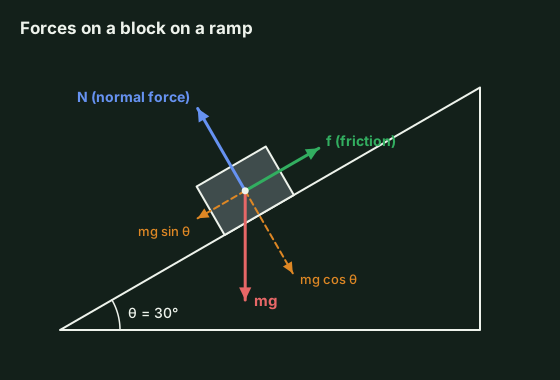
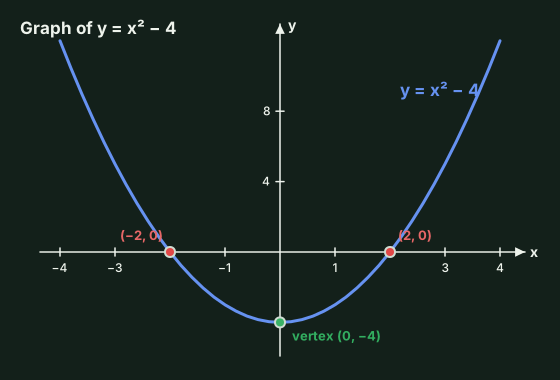
Tap Draw it on any answer, or ask for a diagram directly. StepSolve draws it cleanly, labels every part and explains what it shows.
| Physics | Force diagrams, circuits, rays, waves |
|---|---|
| Maths | Graphs of any function, geometry, number lines |
| Biology | Cells, the heart, food chains, life cycles |
| Chemistry | Atoms, bonds, lab set-ups, reactions |
| Geography | Water cycle, rock cycle, plate boundaries |
Save any diagram as an image for your notes
Add the StepSolve scan button to your phone’s browser once. On any homework page, tap it and each answer appears beside its question.
Then follow the steps for your phone.
Some websites block buttons like this. If nothing happens, take a screenshot and use the app instead.
Start with two free answers. If it helps, pick a plan. Cancel any time from your Gumroad receipt.
Try it free| Monthly | billed monthly | $9.99 |
| 3 months | $8.33/mo · −17% | $25 |
| Yearly | $8.33/mo · −17% | $99.99 |
It shows the working for every answer, and Learn mode hides each step until you’ve tried it. Use it to check your homework and see where you went wrong, not to skip the thinking.
Maths, physics, chemistry, biology, geography, history, languages and essays: anything written as a question. For science and maths it can also draw the diagram or graph.
Yes. The app and the answers come in 20 languages, including Czech, Slovak, Polish, German, Spanish, French, Ukrainian, Arabic, Hindi, Chinese, Japanese and Korean.
They’re sent to the AI only to solve your question and aren’t kept on our server. Your history stays on your own device. The privacy policy has the details.
Any time, from the link in your Gumroad receipt. Your plan keeps working until the end of the period you paid for.